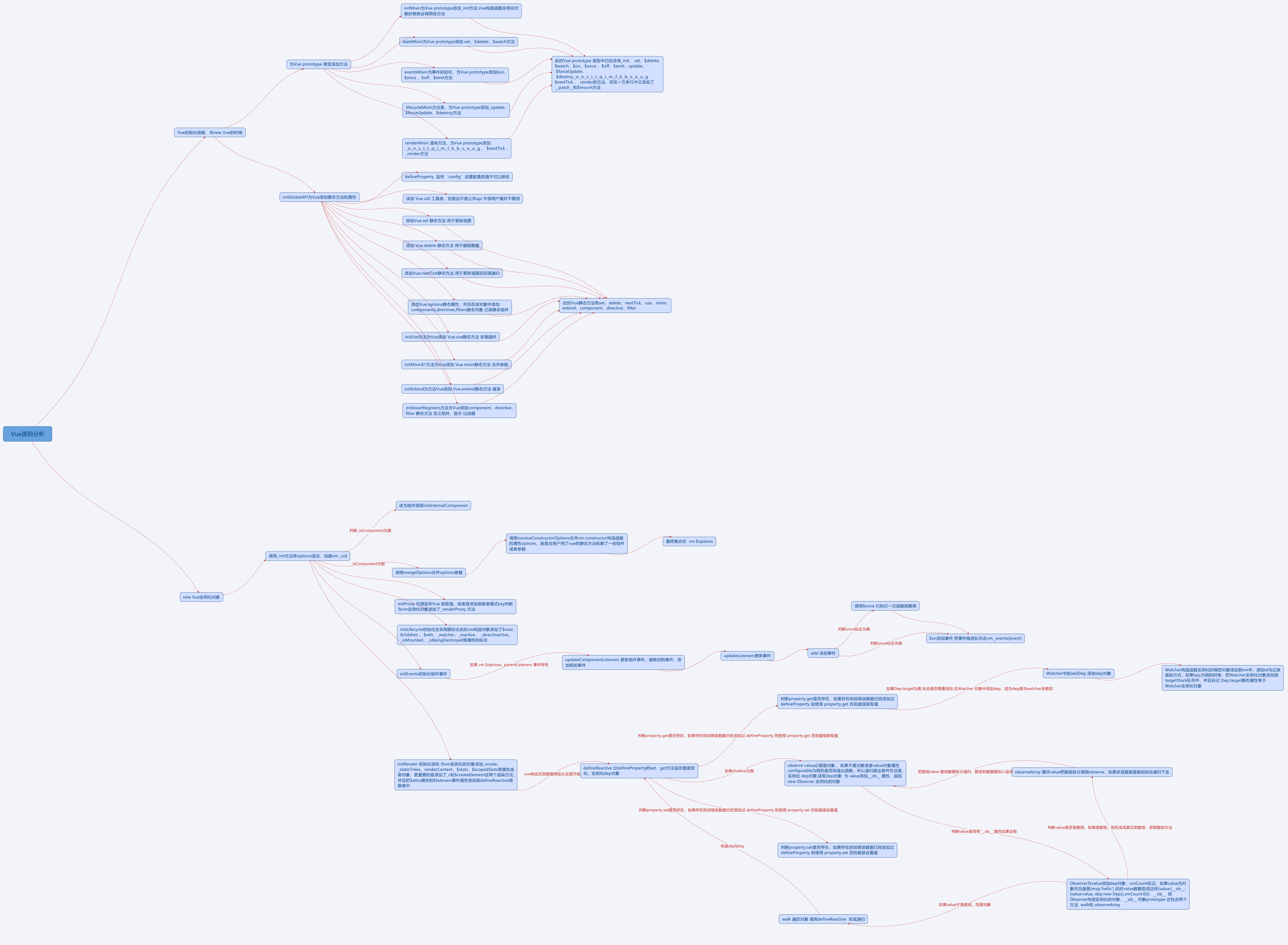
Vue源码之双向数据绑定

双向数据绑定方式

发布订阅方式

一般通过sub, pub的方式实现数据和视图的绑定监听,更新数据方式通常做法是 vm.set(‘property’, value)

脏值检查

angular.js 是通过脏值检测的方式比对数据是否有变更,来决定是否更新视图,最简单的方式就是通过 setInterval() 定时轮询检测数据变动,当然Google不会这么low,angular只有在指定的事件触发时进入脏值检测,大致如下:

  • DOM事件,譬如用户输入文本,点击按钮等。( ng-click )
  • XHR响应事件 ( $http )
  • 浏览器Location变更事件 ( $location )
  • Timer事件( timeout ,interval )
  • 执行 digest() 或apply()

数据劫持

vue.js 是采用数据劫持结合发布者-订阅者模式的方式,通过Object.defineProperty()来劫持各个属性的setter,getter,在数据变动时发布消息给订阅者,触发相应的监听回调。

Vue的双向绑定实现方式

首先实现一个observer类,用来监听数据并通知订阅者执行相应的回调函数
实现compile类,作用是解析指令,为每个指令对应节点绑定更新函数,添加监听数据的订阅者
watch类为observer和compile的桥梁,在自身实例化的时候向订阅器里添加自身
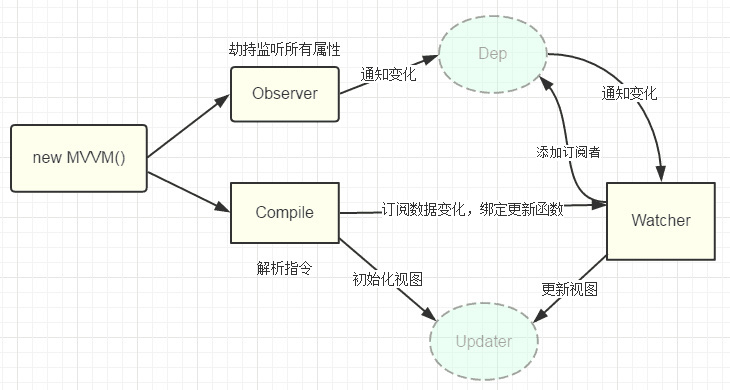
双向绑定原理

1
2
3
4
5
6
7
8
9
10
11
12
13
14
15
16
17
18
19
20
21
22
23
24
25
26
27
28
29
30
31
32
33
34
35
36
37
38
39
40
41
42
43
44
45
46
47
48
49
50
51
52
53
54
55
56
57
58
59
60
61
62
63
64
65
66
67
68
69
70
71
72
73
74
75
76
77
78
79
80
81
82
83
84
85
86
87
88
89
90
91
92
93
94
95
96
97
98
99
100
101
102
103
104
105
106
107
108
109
110
111
112
113
114
115
116
117
118
119
120
121
122
123
124
125
126
127
128
129
130
131
132
133
134
135
136
137
138
139
140
141
142
<!doctype html>
<html lang="en">
<head>
<meta charset="UTF-8">
<meta name="viewport"
content="width=device-width, user-scalable=no, initial-scale=1.0, maximum-scale=1.0, minimum-scale=1.0">
<meta http-equiv="X-UA-Compatible" content="ie=edge">
<title>双向绑定</title>
</head>
<body>
<div id="app">
<form>
<input type="text" v-model="number">
<button type="button" v-click="increment">增加</button>
</form>
<h3 v-bind="number"></h3>
</div>
</body>

<script>
function myVue(options) {
this._init(options);
}

// 初始化
myVue.prototype._init = function (options) {
this.$options = options;
this.$el = document.querySelector(options.el);
this.$data = options.data;
this.$methods = options.methods;

// 对应上图Dep,订阅器
this._binding = {};
this._obverse(this.$data);
this._complie(this.$el);
}

myVue.prototype._obverse = function (obj) {
var value;
for (key in obj) {
if (obj.hasOwnProperty(key)) {
this._binding[key] = {
_directives: []
};
value = obj[key];
if (typeof value === 'object') {
this._obverse(value);
}
var binding = this._binding[key];
Object.defineProperty(this.$data, key, {
enumerable: false,
configurable: true,
get: function () {
console.log(`获取${value}`);
return value;
},
set: function (newVal) {
if (value !== newVal) {
value = newVal;
binding._directives.forEach(function (item) {
item.update();
})
}
}
})
}
}
}

// 解析指令
myVue.prototype._complie = function (root) {
var _this = this;
var nodes = root.children;
for (var i = 0; i < nodes.length; i++) {
var node = nodes[i];
if (node.children.length) {
this._complie(node);
}
if (node.hasAttribute('v-click')) {
node.onclick = (function () {
var attrVal = nodes[i].getAttribute('v-click');
return _this.$methods[attrVal].bind(_this.$data);
})();
}
if (node.hasAttribute('v-model') && (node.tagName == 'INPUT' || node.tagName == 'TEXTAREA')) {
// 双向绑定:添加事件
node.addEventListener('input', (function(key) {
var attrVal = node.getAttribute('v-model');
// 像订阅器里添加订阅者
_this._binding[attrVal]._directives.push(new Watcher(
'input',
node,
_this,
attrVal,
'value'
));
return function() {
_this.$data[attrVal] = nodes[key].value;
}
})(i));
}
if (node.hasAttribute('v-bind')) {
var attrVal = node.getAttribute('v-bind');
_this._binding[attrVal]._directives.push(new Watcher(
'text',
node,
_this,
attrVal,
'innerHTML'
))
}
}
}

function Watcher(name, el, vm, exp, attr) {
this.name = name; //指令名称,例如文本节点,该值设为"text"
this.el = el; //指令对应的DOM元素
this.vm = vm; //指令所属myVue实例
this.exp = exp; //指令对应的值,本例如"number"
this.attr = attr; //绑定的属性值,本例为"innerHTML"

this.update();
}

Watcher.prototype.update = function () {
this.el[this.attr] = this.vm.$data[this.exp];
}

window.onload = function() {
var app = new myVue({
el:'#app',
data: {
number: 0
},
methods: {
increment: function() {
this.number ++;
},
}
})
}
</script>

这里跟Vue的源码写的还是有很多出入,像complie解析dom节点的指令这一块是很复杂而且是单封装成一个函数的,Vue还可以实现自定义指令等等这里都没有实现。observe劫持监听函数也是具体逻辑没这么简单,订阅器这里只是简单的写了一个_bindding = [], 实际也要复杂很多,

源码里的双向数据绑定

首先,Vue会先初始化,调用_init()方法

_init()

1
2
3
4
5
6
7
8
9
10
11
12
13
14
15
16
17
18
19
20
21
22
23
24
25
26
27
28
29
30
31
32
33
34
35
36
37
38
39
40
41
42
43
44
45
46
47
48
49
50
51
52
53
54
55
56
57
58
59
60
61
62
63
64
65
66
67
68
69
70
71
function Vue(options) {
if ("development" !== 'production' && !(this instanceof Vue)) {
warn('Vue is a constructor and should be called with the `new` keyword');
}
this._init(options);
}
Vue.prototype._init = function (options) { //初始化函数
var vm = this;
// a uid
vm._uid = uid$3++; //id

var startTag, //开始标签
endTag; //结束标签
/* istanbul ignore if */
//浏览器性能监控
if ("development" !== 'production' && config.performance && mark) {
startTag = "vue-perf-start:" + (vm._uid);
endTag = "vue-perf-end:" + (vm._uid);
mark(startTag);
}

// a flag to avoid this being observed 一个避免被观察到的标志
vm._isVue = true;
// merge options 合并选项 参数
if (options && options._isComponent) { //判断是否是组件
// optimize internal component instantiation
// since dynamic options merging is pretty slow, and none of the
// internal component options needs special treatment.
//优化内部组件实例化
//因为动态选项合并非常慢,没有一个是内部组件选项需要特殊处理。
//初始化内部组件
initInternalComponent(vm, options);
} else {
//合并参数 将两个对象合成一个对象 将父值对象和子值对象合并在一起,并且优先取值子值,如果没有则取子值
vm.$options = mergeOptions(
resolveConstructorOptions(vm.constructor), // //解析constructor上的options属性的
options || {},
vm
);
}
/* istanbul ignore else */
{
//初始化 代理 监听
initProxy(vm);
}
// expose real self 暴露真实的self
vm._self = vm;
initLifecycle(vm); //初始化生命周期 标志
initEvents(vm); //初始化事件
initRender(vm); // 初始化渲染
callHook(vm, 'beforeCreate'); //触发beforeCreate钩子函数
initInjections(vm); // resolve injections before data/props 在数据/道具之前解决注入问题 //初始化 inject
initState(vm); // //初始化状态
initProvide(vm); // resolve provide after data/props 解决后提供数据/道具 provide 选项应该是一个对象或返回一个对象的函数。该对象包含可注入其子孙的属性,用于组件之间通信。
callHook(vm, 'created'); //触发created钩子函数

/* istanbul ignore if */
//浏览器 性能监听
if ("development" !== 'production' && config.performance && mark) {
vm._name = formatComponentName(vm, false);
mark(endTag);
measure(("vue " + (vm._name) + " init"), startTag, endTag);
}

if (vm.$options.el) {
// Vue 的$mount()为手动挂载,
// 在项目中可用于延时挂载(例如在挂载之前要进行一些其他操作、判断等),之后要手动挂载上。
// new Vue时,el和$mount并没有本质上的不同。
vm.$mount(vm.$options.el);
}
};

其中调用了initState(vm)方法

initState(vm)

1
2
3
4
5
6
7
8
9
10
11
12
13
14
15
16
17
18
19
20
21
22
23
24
25
26
27
28
29
30
function initState(vm) {
vm._watchers = []; //初始化观察者队列
var opts = vm.$options; //初始化参数
//判断是否有props属性,如果有则添加观察者
if (opts.props) {
//初始化props 检验props 数据格式是否是规范的如果是规范的则添加到观察者队列中
initProps(vm, opts.props);
}
if (opts.methods) { //事件
// 初始化事件Methods 把事件 冒泡到 vm[key] 虚拟dom 最外层中
initMethods(vm, opts.methods);
}
if (opts.data) { //初始化数据
// 初始化数据 获取options.data 的数据 将他们添加到 监听者中
initData(vm);
} else {
// 判断value 是否有__ob__ 实例化 dep对象,获取dep对象 为 value添加__ob__ 属性,把vm._data添加到观察者中 返回 new Observer 实例化的对象
observe(vm._data = {}, true /* asRootData */);

}
if (opts.computed) { //计算属性
//初始化计算属性 并且判断属性的key 是否 在 data ,将 计算属性的key 添加入监听者中
initComputed(vm, opts.computed);
}
//options 中的 watch
if (opts.watch && opts.watch !== nativeWatch) {
//初始化Watch
initWatch(vm, opts.watch);
}
}

initData(vm);

1
2
3
4
5
6
7
8
9
10
11
12
13
14
15
16
17
18
19
20
21
22
23
24
25
26
27
28
29
30
31
32
33
34
35
36
37
38
39
40
41
42
43
44
45
46
47
48
49
50
51
52
53
54
55
56
//初始化数据 获取options.data 的数据 将他们添加到 监听者中
function initData(vm) {
//获取到$options.data 数据
var data = vm.$options.data;

//获取data中的数据 判断如果是函数则
data = vm._data = typeof data === 'function' //如果data是函数
? getData(data, vm) //转换数据 如果数据是 一个函数的时候 执行该函数 拿到数据
: data || {}; //直接获取数据

if (!isPlainObject(data)) { //如果不是对象 则发出警告日志
data = {};
"development" !== 'production' && warn(
'data functions should return an object:\n' +
'https://vuejs.org/v2/guide/components.html#data-Must-Be-a-Function',
vm
);
}
// proxy data on instance
var keys = Object.keys(data); //获取数据的key
var props = vm.$options.props; //获取props 属性
var methods = vm.$options.methods; //获取事件
var i = keys.length; //获取数据key的长度
while (i--) { //循环data
var key = keys[i];
{
if (methods && hasOwn(methods, key)) { //如果数据中的 key 与事件 中的定义的key 一样 则发出警告
warn(
("Method \"" + key + "\" has already been defined as a data property."),
vm
);
}
}

if (props && hasOwn(props, key)) { //如果数据中的 key 与props属性 中的定义的key 一样 则发出警告
"development" !== 'production' && warn(
"The data property \"" + key + "\" is already declared as a prop. " +
"Use prop default value instead.",
vm
);
} else if (!isReserved(key)) { //如果不是 以$或者_开头
console.log(vm)
console.log(key)

proxy(vm, "_data", key); //把数据添加到监听者中
console.log(vm)


}
}
// observe data
console.log('data')
console.log(data)

observe(data, true /* asRootData */);
}

这里面我们主要看observe(data, true);方法

observe(vm._data = {}, true)

1
2
3
4
5
6
7
8
9
10
11
12
13
14
15
16
17
18
19
20
21
22
23
24
25
26
27
28
29
30
31
32
33
34
35
36
/**
* Attempt to create an observer instance for a value,
* returns the new observer if successfully observed,
* or the existing observer if the value already has one.
*尝试为值创建一个观察者实例,
*如果成功观察,返回新的观察者;
*或现有的观察员,如果值已经有一个。
*
* 判断value 是否有__ob__ 实例化 dep对象,获取dep对象 为 value添加__ob__ 属性 返回 new Observer 实例化的对象
*/
function observe(value, asRootData) {
if (!isObject(value) || value instanceof VNode) {
//value 不是一个对象 或者 实例化 的VNode
return
}
var ob;
if (hasOwn(value, '__ob__') && value.__ob__ instanceof Observer) {
ob = value.__ob__;
} else if (
shouldObserve && //shouldObserve 为真
!isServerRendering() && //并且不是在服务器node环境下
(Array.isArray(value) || isPlainObject(value)) && //是数组或者是对象
Object.isExtensible(value) && //Object.preventExtensions(O) 方法用于锁住对象属性,使其不能够拓展,也就是不能增加新的属性,但是属性的值仍然可以更改,也可以把属性删除,Object.isExtensible用于判断对象是否可以被拓展
!value._isVue //_isVue为假
) {
//实例化 dep对象 为 value添加__ob__ 属性
ob = new Observer(value);
}
//如果是RootData,即咱们在新建Vue实例时,传到data里的值,只有RootData在每次observe的时候,会进行计数。 vmCount是用来记录此Vue实例被使用的次数的, 比如,我们有一个组件logo,页面头部和尾部都需要展示logo,都用了这个组件,那么这个时候vmCount就会计数,值为2

if (asRootData && ob) { //是根节点数据的话 并且 ob 存在
ob.vmCount++; //统计有几个vm
}
// * 实例化 dep对象,获取dep对象 为 value添加__ob__ 属性
return ob
}

这里会为value添加创建一个观察者也就是new Observer(value);,下面我们来看Observer函数

Observer构造函数

1
2
3
4
5
6
7
8
9
10
11
12
13
14
15
16
17
18
19
20
21
22
23
24
25
26
27
28
29
30
31
32
33
34
35
36
37
38
39
40
41
42
43
44
45
46
47
48
49
50
51
52
53
54
/**
* Observer class that is attached to each observed
* object. Once attached, the observer converts the target
* object's property keys into getter/setters that
* collect dependencies and dispatch updates.
* *每个观察到的观察者类
*对象。一旦被连接,观察者就转换目标。
*对象的属性键为吸收器/设置器
*收集依赖关系并发送更新。
*
* 实例化 dep对象,获取dep对象 为 value添加__ob__ 属性
*/
var Observer = function Observer(value) {
this.value = value;
this.dep = new Dep();
this.vmCount = 0;
//设置监听 value 必须是对象
def(value, '__ob__', this);
if (Array.isArray(value)) { //判断是不是数组
var augment = hasProto //__proto__ 存在么 高级浏览器都会有这个
? protoAugment
: copyAugment;
augment(value, arrayMethods, arrayKeys);
this.observeArray(value);
} else {
this.walk(value);
}
};

/**
* Walk through each property and convert them into
* getter/setters. This method should only be called when
* value type is Object.
* *遍历每个属性并将其转换为
* getter / setter。此方法只应在调用时调用
*值类型是Object。
*/
Observer.prototype.walk = function walk(obj) {
var keys = Object.keys(obj);
for (var i = 0; i < keys.length; i++) {
defineReactive(obj, keys[i]);
}
};

/**
* Observe a list of Array items.
* 观察数组项的列表。
* 把数组拆分一个个 添加到观察者 上面去
*/
Observer.prototype.observeArray = function observeArray(items) {
for (var i = 0, l = items.length; i < l; i++) {
observe(items[i]);
}
};

这里Observer会判断value类型是否为数组,如果是数组的话会调用observeArray方法,拆分数组一个个重新调用observe方法。
否则的话就调用walk方法,会遍历对象每一个属性然后调用defineReactive方法

defineReactive()

1
2
3
4
5
6
7
8
9
10
11
12
13
14
15
16
17
18
19
20
21
22
23
24
25
26
27
28
29
30
31
32
33
34
35
36
37
38
39
40
41
42
43
44
45
46
47
48
49
50
51
52
53
54
55
56
57
58
59
60
61
62
63
64
65
66
67
68
69
70
71
72
73
74
75
76
77
78
/**
* Define a reactive property on an Object.
* 在对象上定义一个无功属性。
* 更新数据
* 通过defineProperty的set方法去通知notify()订阅者subscribers有新的值修改
* 添加观察者 get set方法
*/
function defineReactive(obj, //对象
key,//对象的key
val, //监听的数据 返回的数据
customSetter, // 日志函数
shallow //是否要添加__ob__ 属性
) {
//实例化一个主题对象,对象中有空的观察者列表
var dep = new Dep();
//获取描述属性
var property = Object.getOwnPropertyDescriptor(obj, key);
//获取实力对象属性或者方法,包括定义的描述属性
var _property = Object.getOwnPropertyNames(obj);
if (property && property.configurable === false) {
return
}

// cater for pre-defined getter/setters

var getter = property && property.get;

if (!getter && arguments.length === 2) {
val = obj[key];
}
var setter = property && property.set;
//判断value 是否有__ob__ 实例化 dep对象,获取dep对象 为 value添加__ob__ 属性递归把val添加到观察者中 返回 new Observer 实例化的对象
var childOb = !shallow && observe(val);
//定义描述
Object.defineProperty(obj, key, {
enumerable: true,
configurable: true,
get: function reactiveGetter() {
var value = getter ? getter.call(obj) : val;
if (Dep.target) { //Dep.target 静态标志 标志了Dep添加了Watcher 实例化的对象
//添加一个dep
dep.depend();
if (childOb) { //如果子节点存在也添加一个dep
childOb.dep.depend();
if (Array.isArray(value)) { //判断是否是数组 如果是数组
dependArray(value); //则数组也添加dep
}
}
}
return value
},
set: function reactiveSetter(newVal) {
var value = getter ? getter.call(obj) : val;
/* eslint-disable no-self-compare 新旧值比较 如果是一样则不执行了*/
if (newVal === value || (newVal !== newVal && value !== value)) {
return
}
/* eslint-enable no-self-compare
* 不是生产环境的情况下
* */
if ("development" !== 'production' && customSetter) {
customSetter();
}
if (setter) {
//set 方法 设置新的值
setter.call(obj, newVal);
} else {
//新的值直接给他
val = newVal;
}

//observe 添加 观察者
childOb = !shallow && observe(newVal);
//更新数据
dep.notify();
}
});
}

这是双向绑定的核心–通过Object.defineProperty重写value的get,set,也就是读取和设置新值。

其中Dep可以理解为一个订阅器,

  1. 在get是会判断是否有Dep.target从而调用dep.depend()。Dep.target是Watcher的实例
  2. 在set时会判断调用dep.notify(),为订阅器里的所有订阅者更新视图。

下面是Dep的源码:

Dep

1
2
3
4
5
6
7
8
9
10
11
12
13
14
15
16
17
18
19
20
21
22
23
24
25
26
27
28
29
30
31
32
33
34
35
36
37
38
39
40
/**
* A dep is an observable that can have multiple dep是可观察到的,可以有多个
* directives subscribing to it.订阅它的指令。
*
*/
//主题对象Dep构造函数 主要用于添加发布事件后,用户更新数据的 响应式原理之一函数
var Dep = function Dep() {
//uid 初始化为0
this.id = uid++;
/* 用来存放Watcher对象的数组 */
this.subs = [];
};

Dep.prototype.addSub = function addSub(sub) {
/* 在subs中添加一个Watcher对象 */
this.subs.push(sub);
};

Dep.prototype.removeSub = function removeSub(sub) {
/*删除 在subs中添加一个Watcher对象 */
remove(this.subs, sub);
};
//this$1.deps[i].depend();
//为Watcher 添加 为Watcher.newDeps.push(dep); 一个dep对象
Dep.prototype.depend = function depend() {
//添加一个dep target 是Watcher dep就是dep对象
if (Dep.target) {
//像指令添加依赖项
Dep.target.addDep(this);
}
};
/* 通知所有Watcher对象更新视图 */
Dep.prototype.notify = function notify() {
// stabilize the subscriber list first
var subs = this.subs.slice();
for (var i = 0, l = subs.length; i < l; i++) {
//更新数据
subs[i].update();
}
};

这里面有上面defineReactive调用比较重要的depend、notify方法。
依据Dep.target会调用depend方法。depend方法会调用Dep.target.addDep(this);方法,此方法调用dep.addSub(this);向订阅器添加了订阅者。

1
2
3
4
5
6
7
8
9
10
11
12
13
/**
* Add a dependency to this directive. 向该指令添加依赖项。
*/
Watcher.prototype.addDep = function addDep(dep) {
var id = dep.id; //dep.id 一个持续相加的id
if (!this.newDepIds.has(id)) {//如果id存在
this.newDepIds.add(id); //添加一个id
this.newDeps.push(dep); //添加一个deps
if (!this.depIds.has(id)) { //如果depIds 不存在id则添加一个addSub //添加一个sub
dep.addSub(this);
}
}
};

也就是说,defineReactive内部的get会依据是否有Dep.target来向订阅器添加订阅者

那Dep.target到底是什么以及它的作用:
Dep.target是Watcher的实例,
了解作用之前我们看一下都在哪些地方调用了Dep.target?

1
2
3
4
5
6
7
8
9
10
11
12
13
14
15
Dep.target = null;
var targetStack = [];
function pushTarget(_target) {
//target 是Watcher dep就是dep对象
if (Dep.target) { //静态标志 Dep当前是否有添加了target
//添加一个pushTarget
targetStack.push(Dep.target);
}
Dep.target = _target;
}

function popTarget() {
// 出盏一个pushTarget
Dep.target = targetStack.pop();
}

Dep.target虽然是全局属性,但是被封装在上面这两个函数中
那又有什么地方调用了pushTarget呢?

1
2
3
4
5
6
7
8
9
10
11
12
13
14
15
16
17
18
19
20
21
22
23
24
25
26
27
28
29
30
31
32
33
34
//  第一处
//触发钩子函数
function callHook(vm, //虚拟dom vonde
hook //钩子函数的key
) {
// #7573 disable dep collection when invoking lifecycle hooks
//调用生命周期钩子时禁用dep集合
//Dep.target = _target; //存储
pushTarget();
// ...
popTarget();
}
// 第二处
//转换数据 如果数据是 一个函数的时候 执行该函数 拿到数据
function getData(data, vm) {
// #7573 disable dep collection when invoking data getters
//调用数据getter时禁用dep收集
pushTarget();
// ...
popTarget();
}

// 第三处

/**
* Evaluate the getter, and re-collect dependencies.
* 计算getter,并重新收集依赖项。 获取value值
*/
Watcher.prototype.get = function get() {
//添加一个dep target
pushTarget(this);
// ...
popTarget();
};

以上虽然有三处调用pushTarget,但实际只有一处有实际作用,第一二处Dep.target反而设置为空,没有发挥实际作用。而第三处是在Watcher类原型方法上调用的,我们来看看Watcher类

Watcher

1
2
3
4
5
6
7
8
9
10
11
12
13
14
15
16
17
18
19
20
21
22
23
24
25
26
27
28
29
30
31
32
33
34
35
36
37
38
39
40
41
42
43
44
45
46
47
48
49
50
51
52
53
54
55
56
57
58
59
60
61
62
63
64
65
66
67
68
69
70
71
72
73
74
75
76
77
78
79
80
81
82
83
84
85
86
87
88
89
90
91
92
93
94
95
96
97
98
99
100
101
102
103
104
105
106
107
108
109
110
111
112
113
114
115
116
117
118
119
120
121
122
123
124
125
126
127
128
129
130
131
132
133
134
135
136
137
138
139
140
141
142
143
144
145
146
147
148
149
150
151
152
153
154
155
156
157
158
159
160
161
162
163
164
165
166
167
168
169
170
171
172
173
174
175
176
177
178
179
180
181
182
183
184
185
186
187
188
189
190
191
192
193
194
195
196
197
198
199
200
201
202
203
204
205
206
207
208
209
210
211
212
213
214
215
216
217
218
219
220
221
222
223
224
225
226
227
228
229
230
231
232
233
234
235
236
237
238
239
240
241
242
243
244
245
246
247
248
249
250
251
252
253
254
255
256
257
258
259
260
261
262
263
264
265
266
267
268
269
270
271
/**
* A watcher parses an expression, collects dependencies,
* and fires callback when the expression value changes.
* This is used for both the $watch() api and directives.
* *观察者分析表达式,收集依赖项,
*并在表达式值更改时触发回调。
*这用于$watch() api和指令。
* 当前vue实例、updateComponent函数、空函数。
*/
var Watcher = function Watcher(vm, //vm dom
expOrFn, //获取值的函数,或者是更新viwe试图函数
cb, //回调函数,回调值给回调函数
options, //参数
isRenderWatcher//是否渲染过得观察者
) {
this.vm = vm;
//是否是已经渲染过得观察者
if (isRenderWatcher) { //把当前 Watcher 对象赋值给 vm._watcher上
vm._watcher = this;
}
//把观察者添加到队列里面 当前Watcher添加到vue实例上
vm._watchers.push(this);
// options
if (options) { //如果有参数
this.deep = !!options.deep; //实际
this.user = !!options.user; //用户
this.lazy = !!options.lazy; //懒惰 ssr 渲染
this.sync = !!options.sync; //如果是同步
} else {
this.deep = this.user = this.lazy = this.sync = false;
}
this.cb = cb; //回调函数
this.id = ++uid$1; // uid for batching uid为批处理 监听者id
this.active = true; //激活
this.dirty = this.lazy; // for lazy watchers 对于懒惰的观察者
this.deps = []; // 观察者队列
this.newDeps = []; // 新的观察者队列
// 内容不可重复的数组对象
this.depIds = new _Set();
this.newDepIds = new _Set();
// 把函数变成字符串形式
this.expression = expOrFn.toString();
// parse expression for getter
//getter的解析表达式
if (typeof expOrFn === 'function') {
//获取值的函数
this.getter = expOrFn;
} else {
//如果是keepAlive 组件则会走这里
//path 因该是路由地址
if (bailRE.test(path)) { // 匹配上 返回 true var bailRE = /[^\w.$]/; //匹配不是 数字字母下划线 $符号 开头的为true
return
}

// //匹配不上 path在已点分割
// var segments = path.split('.');
// return function (obj) {
//
// for (var i = 0; i < segments.length; i++) {
// //如果有参数则返回真
// if (!obj) {
// return
// }
// //将对象中的一个key值 赋值给该对象 相当于 segments 以点拆分的数组做obj 的key
// obj = obj[segments[i]];
// }
// //否则返回一个对象
// return obj
// }

//匹配不是 数字字母下划线 $符号 开头的为true

this.getter = parsePath(expOrFn);
if (!this.getter) { //如果不存在 则给一个空的数组
this.getter = function () {};
"development" !== 'production' &&
warn("Failed watching path: \"" + expOrFn + "\" " +
'Watcher only accepts simple dot-delimited paths. ' +
'For full control, use a function instead.',
vm
);
}
}
this.value = this.lazy ? // lazy为真的的时候才能获取值 这个有是组件才为真
undefined :
this.get(); //计算getter,并重新收集依赖项。 获取值
};

/**
* Evaluate the getter, and re-collect dependencies.
* 计算getter,并重新收集依赖项。 获取value值
*/
Watcher.prototype.get = function get() {
//添加一个dep target
pushTarget(this);
var value;
var vm = this.vm;
try {
//获取值 如果报错 则执行catch
value = this.getter.call(vm, vm);
} catch (e) {
if (this.user) {
handleError(e, vm, ("getter for watcher \"" + (this.expression) + "\""));
} else {
throw e
}
} finally {
// "touch" every property so they are all tracked as
// dependencies for deep watching
//“触摸”每个属性,以便它们都被跟踪为
//依赖深度观察
if (this.deep) {

// //如果val 有__ob__ 属性
// if (val.__ob__) {
// var depId = val.__ob__.dep.id;
// // seen 中是否含有depId 属性或者方法
// if (seen.has(depId)) {
// return
// }
// //如果没有则添加进去
// seen.add(depId);
// }
//为 seenObjects 深度收集val 中的key
traverse(value);
}
// 出盏一个pushTarget
popTarget();
//清理依赖项集合。
this.cleanupDeps();
}
//返回值
return value
};

/**
* Add a dependency to this directive. 向该指令添加依赖项。
*/
Watcher.prototype.addDep = function addDep(dep) {
var id = dep.id; //dep.id 一个持续相加的id
if (!this.newDepIds.has(id)) {//如果id存在
this.newDepIds.add(id); //添加一个id
this.newDeps.push(dep); //添加一个deps
if (!this.depIds.has(id)) { //如果depIds 不存在id则添加一个addSub //添加一个sub
dep.addSub(this);
}
}
};

/**
* Clean up for dependency collection.
* 清理观察者依赖项集合。
*/
Watcher.prototype.cleanupDeps = function cleanupDeps() {
var this$1 = this;
var i = this.deps.length; //遍历
while (i--) {
var dep = this$1.deps[i];
if (!this$1.newDepIds.has(dep.id)) {
//清除 sub
dep.removeSub(this$1);
}
}
var tmp = this.depIds; //获取depid
this.depIds = this.newDepIds; //获取新的depids
this.newDepIds = tmp; //旧的覆盖新的
this.newDepIds.clear(); //清空对象

//互换值
tmp = this.deps; //
this.deps = this.newDeps;
this.newDeps = tmp;
this.newDeps.length = 0;
};

/**
* Subscriber interface.用户界面。
* Will be called when a dependency changes.
* 将在依赖项更改时调用。
*/
Watcher.prototype.update = function update() {
/* istanbul ignore else 伊斯坦布尔忽略其他 */
if (this.lazy) { //懒惰的 忽略
this.dirty = true;
} else if (this.sync) { //如果是同步
//更新数据
this.run();
} else {
//如果是多个观察者
queueWatcher(this); //队列中的观察者
}
};

/**
* Scheduler job interface. 调度器的工作界面。
* Will be called by the scheduler. 将被调度程序调用。
*/
Watcher.prototype.run = function run() {
if (this.active) { //活跃
var value = this.get(); //获取值 函数 expOrFn
if (
value !== this.value || //如果值不相等
// Deep watchers and watchers on Object/Arrays should fire even 深度观察和对象/数组上的观察应该是均匀的
// when the value is the same, because the value may 当值相等时,因为值可以
// have mutated. 有突变。
isObject(value) || //或者值的object
this.deep //获取deep为true
) {
// set new value
var oldValue = this.value; //获取旧的值
this.value = value; //新的值赋值
if (this.user) { //如果是user 用更新值
try {
this.cb.call(this.vm, value, oldValue); //更新回调函数 获取到新的值 和旧的值
} catch (e) {
handleError(e, this.vm, ("callback for watcher \"" + (this.expression) + "\""));
}
} else {
this.cb.call(this.vm, value, oldValue);//更新回调函数 获取到新的值 和旧的值
}
}
}
};

/**
* Evaluate the value of the watcher. 评估观察者的值。
* This only gets called for lazy watchers. 这只适用于懒惰的观察者。
*/
Watcher.prototype.evaluate = function evaluate() {
this.value = this.get(); //获取值
this.dirty = false; // 懒惰者标志 标志已经获取过一次值
};

/**
* Depend on all deps collected by this watcher.
* 依赖于此监视程序收集的所有dep。
* 循环deps 收集 newDeps dep 当newDeps 数据被清空的时候重新收集依赖
*/
Watcher.prototype.depend = function depend() {
// this.newDeps.push(dep); //添加一个deps
//deps=this.newDeps
var this$1 = this;
var i = this.deps.length;
while (i--) {
// 为Watcher 添加dep 对象
// this.newDeps.push(dep); //添加一个deps
this$1.deps[i].depend();
}
};

/**
* Remove self from all dependencies' subscriber list.
* 从所有依赖项的订阅方列表中删除self。
*/
Watcher.prototype.teardown = function teardown() {
var this$1 = this;
if (this.active) {
// remove self from vm's watcher list 从vm的监视者列表中删除self
// this is a somewhat expensive operation so we skip it 这是一个有点昂贵的操作,所以我们跳过它
// if the vm is being destroyed. 如果vm被销毁。
if (!this.vm._isBeingDestroyed) { //是否销毁的标志
remove(this.vm._watchers, this); //删除观察者
}
var i = this.deps.length;
while (i--) {
//删除 removeSub
this$1.deps[i].removeSub(this$1);
}
this.active = false;
}
};

从Watcher类可以看到,每次实例化Watcher的时候都会调用this.get函数,
这里this.get()主要有两步骤

  1. 调用pushTarget
  2. 调用getter方法触发Observer的get方法将自己加入订阅者

那又是什么时候会实例化Watcher呢

  1. 安装组件mountComponent
  2. 初始化计算属性 并且判断属性的key是否在data中 ,将计算属性的key添加入监听者中initComputed
  3. Vue.prototype.$watch中
    1. keep-alive组件的mounted
    2. 封装在createWatcher函数中
      1. 初始化watch监听initWatch

watch 和 computed的区别

computed计算属性

计算属性的初始化是发生在Vue实例初始化的initState里面然后调用initComputed

initComputed

1
2
3
4
5
6
7
8
9
10
11
12
13
14
15
16
17
18
19
20
21
22
23
24
25
26
27
28
29
30
31
32
33
34
35
36
37
38
39
40
41
42
43
const computedWatcherOptions = { lazy: true }
function initComputed (vm: Component, computed: Object) {
// $flow-disable-line
const watchers = vm._computedWatchers = Object.create(null)
// computed properties are just getters during SSR
const isSSR = isServerRendering()

for (const key in computed) {
const userDef = computed[key]
const getter = typeof userDef === 'function' ? userDef : userDef.get
if (process.env.NODE_ENV !== 'production' && getter == null) {
warn(
`Getter is missing for computed property "${key}".`,
vm
)
}

if (!isSSR) {
// create internal watcher for the computed property.
watchers[key] = new Watcher(
vm,
getter || noop,
noop,
computedWatcherOptions
)
}

// component-defined computed properties are already defined on the
// component prototype. We only need to define computed properties defined
// at instantiation here.
if (!(key in vm)) {
// 如果computed 属性key 不在虚拟dom中
// 定义计算属性 并且 把属性的数据 添加到对象监听中
defineComputed(vm, key, userDef)
} else if (process.env.NODE_ENV !== 'production') {
if (key in vm.$data) {
warn(`The computed property "${key}" is already defined in data.`, vm)
} else if (vm.$options.props && key in vm.$options.props) {
warn(`The computed property "${key}" is already defined as a prop.`, vm)
}
}
}
}

initComputed这段代码做了几件事

  1. 获取这个 userDef 对应的 getter 函数(存放到 watcher.getter 中,用于后面的计算)
  2. 每个computed配发watcher;这个watcher属性很重要 { lazy: true }
  3. defineComputed处理;
  4. 收集所有computed的watcher;

在Watcher源码里lazy作用

  1. computed新建watcher的时候,传入lazy,作用是把计算结果缓存起来,而不是每次使用都要重新计算;
  2. 保存设置的 getter,把用户设置的 computed-getter,存放到 watcher.getter 中,用于后面的计算;
  3. watcher.value 存放计算结果,但是这里有个条件,因为 lazy 的原因,不会新建实例并马上读取值;这里可以算是 Vue 的一个优化,只有你再读取 computed,再开始计算,而不是初始化就开始计算值了,虽然没有一开始计算,但是计算 value 还是这个 watcher.get 这个方法

defineComputed

1
2
3
4
5
6
7
8
9
10
11
12
13
14
15
16
17
18
19
20
21
22
function defineComputed (target,key,userDef){
//userDef是function,getter设为userDef或userDef的值
if (typeof userDef === 'function') {
//shouldCache是否缓存,这也是使用computed属性最重要的原因,computed值会被缓存起来,而不是每次重新执行函数生成
sharedPropertyDefinition.get = shouldCache
? createComputedGetter(key)
: userDef;
sharedPropertyDefinition.set = null;
//userDef是不是function,getter设为userDef.get,setter设为userDef.set
} else {
sharedPropertyDefinition.get = userDef.get
? shouldCache && userDef.cache !== false
? createComputedGetter(key)
: userDef.get
: null;
sharedPropertyDefinition.set = userDef.set
? userDef.set
: null;
}
//,将computed属性代理到vm上,通过vm[key]访问computed属性值
Object.defineProperty(target, key, sharedPropertyDefinition);
}

defineComputed 方法实质也是利用 Object.defineProperty 给计算属性添加 set get。
set函数默认是空函数,如果用户设置,则使用用户设置

createComputedGetter

1
2
3
4
5
6
7
8
9
10
11
12
13
14
15
16
function createComputedGetter (key) {
return function computedGetter () {
const watcher = this._computedWatchers && this._computedWatchers[key]
if (watcher) {
watcher.depend()
return watcher.evaluate()
}
}
}
Watcher.prototype.depend = function() {
var i = this.deps.length;
while (i--) {
this.deps[i].depend();
dep.addSub(Dep.target)
}
};

缓存控制是通过watcher.dirty控制的,watcher.evaluate用来重新计算,更新缓存值,并重置dirty为false,表示缓存已更新

watch

1
2
3
4
5
6
7
8
9
10
11
12
13
14
15
16
17
18
19
Vue.prototype.$watch = function (
expOrFn: string | Function,
cb: any,
options?: Object
): Function {
const vm: Component = this
if (isPlainObject(cb)) {
return createWatcher(vm, expOrFn, cb, options)
}
options = options || {}
options.user = true
const watcher = new Watcher(vm, expOrFn, cb, options)
if (options.immediate) {
cb.call(vm, watcher.value)
}
return function unwatchFn () {
watcher.teardown()
}
}

也就是说,侦听属性 watch 最终会调用 $watch 方法,这个方法首先判断 cb 如果是一个对象,则调用 createWatcher 方法,这是因为 $watch 方法是用户可以直接调用的,它可以传递一个对象,也可以传递函数。接着执行 const watcher = new Watcher(vm, expOrFn, cb, options) 实例化了一个 watcher,这里需要注意一点这是一个 user watcher,因为 options.user = true。通过实例化 watcher 的方式,一旦我们 watch 的数据发送变化,它最终会执行 watcher 的 run 方法,执行回调函数 cb,并且如果我们设置了 immediate 为 true,则直接会执行回调函数 cb。最后返回了一个 unwatchFn 方法,它会调用 teardown 方法去移除这个 watcher。

所以本质上侦听属性也是基于 Watcher 实现的,它是一个 user watcher。其实 Watcher 支持了不同的类型。

Vue双向绑定的问题

监听对象问题

  • 无法检测对象属性的增、删、改

对象和数组都是js里的引用类型,在实际存储中,数据是存储在堆中的,利用存储在栈里的对象名或者数组名的指针进行索引,因此也存在在浅拷贝和深拷贝以及等号赋值时,到底是仅仅新建了一个指针指向了同一份数据,还是两个指针分别指向了两份完全一样的数据的问题

监听数组/对象的问题

  • 无法检测数组的新增
  • 无法检测通过索引改变数组的操作。

Vue2.0中响应式数据是通过Object.defineProperty实现,因此无法检测数组/对象的新增。
为什么不能检测通过索引改变数组的操作呢??
实际上Object.defineProperty 可以监听到数组改变,但是Vue没有这么做,尤雨溪给出理由是性能问题。

解决方法

1
2
3
4
5
6
7
this.$set(obj, key ,value) - 可实现增、改
// watch时添加deep:true深度监听,只能监听到属性值的变化,新增、删除属性无法监听
this.$watch('key', this.data, {
deep: true
// immediate: true // 是否第一次触发
});
watch时直接监听某个key

this.$set源码: Vue.$set = set

1
2
3
4
5
6
7
8
9
10
11
12
13
14
15
16
17
18
19
20
21
22
23
24
25
26
27
28
29
30
31
32
33
34
35
36
37
38
39
40
41
42
43
44
45
46
47
48
49
50
51
52
53
54
55
56
/**
* Set a property on an object. Adds the new property and
* triggers change notification if the property doesn't
* already exist.
**在对象上设置属性。添加新属性和触发器更改通知,如果该属性不
* 已经存在。
*/
//如果是数组 并且key是数字 就更新数组
//如果是对象则重新赋值
//如果 (target).__ob__ 存在则表明该数据以前添加过观察者对象中 //通知订阅者ob.value更新数据 添加观察者 define set get 方法
function set(target, key, val) {
if ("development" !== 'production' &&
//判断数据 是否是undefined或者null
(isUndef(target) || isPrimitive(target)) //判断数据类型是否是string,number,symbol,boolean
) {
//必须是对象数组才可以 否则发出警告
warn(("Cannot set reactive property on undefined, null, or primitive value: " + ((target))));
}

//如果是数组 并且key是数字
if (Array.isArray(target) && isValidArrayIndex(key)) {
//设置数组的长度
target.length = Math.max(target.length, key);
//像数组尾部添加一个新数据,相当于push
target.splice(key, 1, val);
return val
}
//判断key是否在target 上,并且不是在Object.prototype 原型上,而不是通过父层原型链查找的
if (key in target && !(key in Object.prototype)) {
target[key] = val; //赋值
return val
}
//声明一个对象ob 值为该target对象中的原型上面的所有方法和属性 ,表明该数据加入过观察者中
var ob = (target).__ob__;

//vmCount 记录vue被实例化的次数
// _isVue 是不是vue
if (target._isVue || (ob && ob.vmCount)) {
//如果不是生产环境,发出警告
"development" !== 'production' && warn(
'Avoid adding reactive properties to a Vue instance or its root $data ' +
'at runtime - declare it upfront in the data option.'
);
return val
}
//如果ob不存在 说明他没有添加观察者 则直接赋值
if (!ob) {
target[key] = val;
return val
}
//通知订阅者ob.value更新数据 添加观察者 define set get 方法
defineReactive(ob.value, key, val);
//通知订阅者ob.value更新数据
ob.dep.notify();
return val
}

Vue源码结构

参考文章

https://segmentfault.com/a/1190000014274840
https://juejin.im/post/6844903854740340749#heading-3
https://www.cnblogs.com/youhong/p/12173354.html
Vue源码分析